

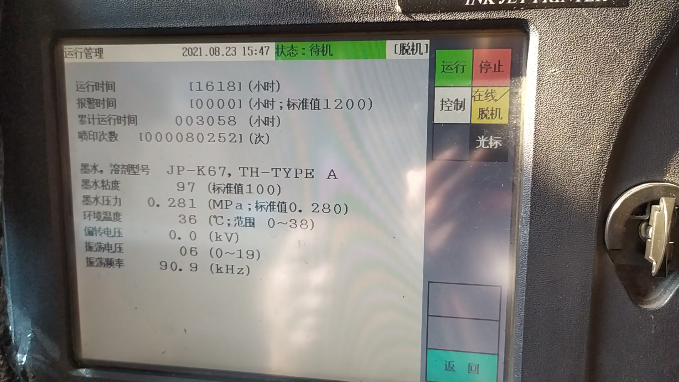
Let’s look at the parameters, the parameters are in “Run Management” and we can see the corresponding parameters.
The three main ones we can see here are the oscillating voltage, the ink pressure, and the viscosity of the ink. Now the viscosity is normal, the standard value is 100, 97 is normal. Then the pressure is also, 0.280, now 0.281, which is the pressure of the micro-character printer, and then the oscillating voltage is 6:
When the ink point splits badly, or if the charge is not good, we need to adjust the oscillating voltage. In “Maintenance Operation” there is an “Oscillating Voltage Reset” and now it is 6, we can click on the “cursor” directly, we can modify it, can increase or decrease:
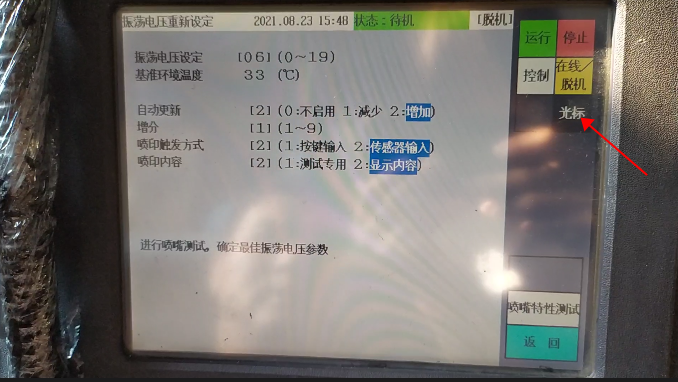
For each adjustment, we use a magnifying glass to see how the ink point splits until the ink point splits well, and then we can click back and it will be saved automatically. This is oscillating voltage regulation.
If the printing effect is not good, first we have to click on “run management”, we need to see if the viscosity is normal, the pressure is normal, and whether our ink line position is in the middle, if these are all very normal, and then printing is still hanging ink, that is, the printing effect is not good, so we may need to maintain the machine, and then may need to replace the main filter.
